WordPress Studio Features
For years, (prior to WordPress Studio), developers have navigated the challenges of local WordPress development. Setting up a local environment can be complex, and sharing progress with clients often involves cumbersome staging sites or deploying unfinished work. These hurdles can slow down projects and complicate feedback loops, turning a streamlined workflow into a series of technical obstacles.
Enter WordPress Studio, a new, free, and open-source application designed to solve these exact problems. It offers a fast, lightweight environment for building everything from plugins and themes to entire websites. But Studio is much more than just another local server. It comes packed with powerful, integrated tools that are often found only in premium, paid applications.
My goal here is to highlight four of the most surprising and game-changing features that set WordPress Studio apart.
These capabilities can fundamentally improve how you build, share, and deploy WordPress sites, all from a single, and oh yeah.., free application.
1. You Can Create Live, Shareable Previews for Free
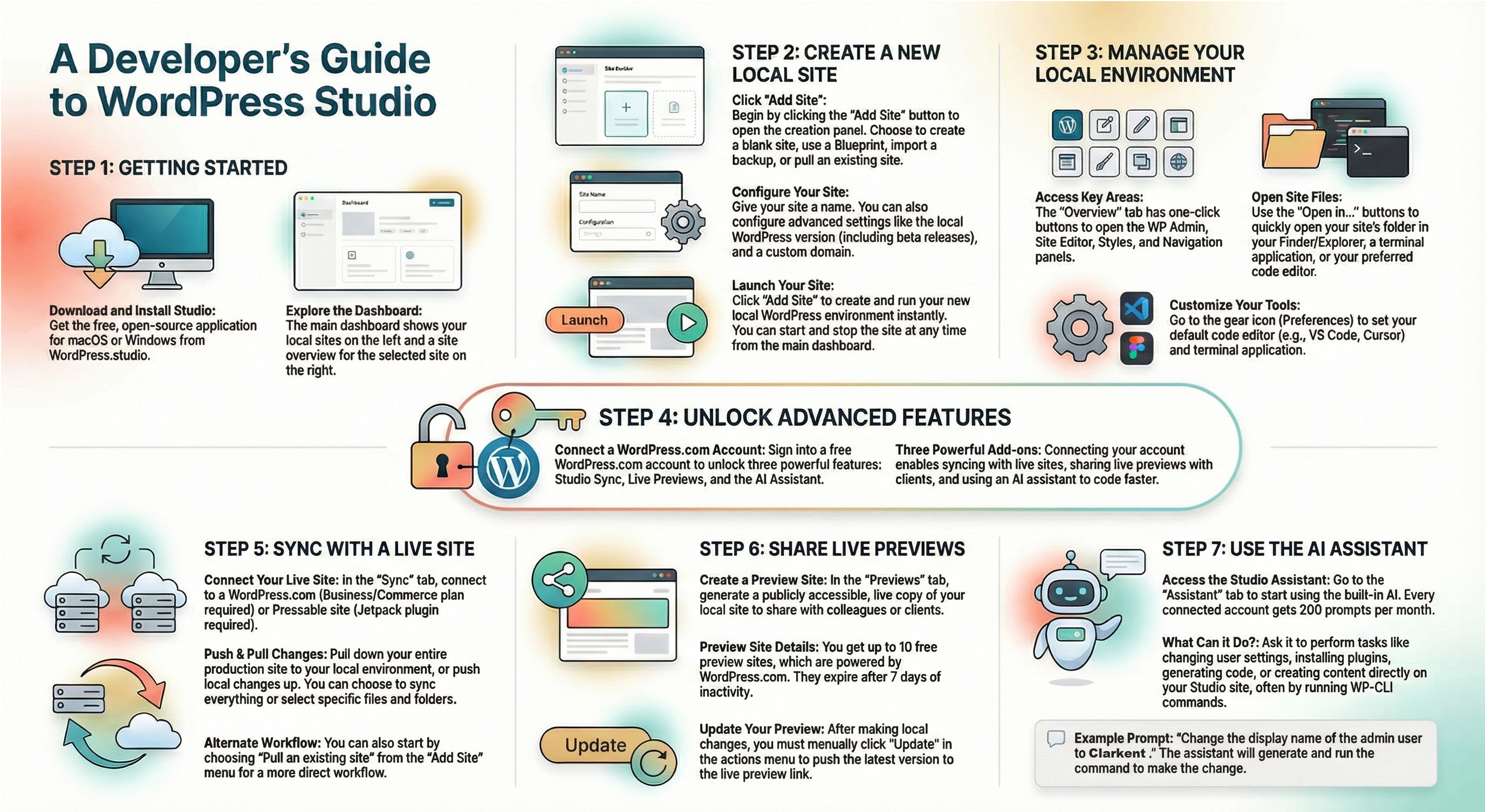
One of Studio’s most powerful features is the ability to generate live, shareable previews of your local site. This functionality creates a publicly accessible copy of your work-in-progress, allowing you to easily share it with colleagues or clients for feedback without deploying it to a staging or production server.
The best part? This feature doesn’t require a paid plan. All you need is a free WordPress.com account to get started. Under the hood, these preview sites are powered by WordPress.com, giving you a stable and reliable way to showcase your work.
Key details of the Previews feature include:
- You can maintain up to 10 free preview sites at any given time across all your Studio projects.
- Preview sites expire after seven days since their last update, but you can refresh them as often as you need to reset the timer.
- Updates are not automatic. After making local changes, you must manually trigger an update from the Studio interface to push them to the live preview site. This ensures you control exactly what and when your client sees.
For freelancers and agencies, this feature is a significant improvement, simplifying the client feedback process. This manual push is a critical feature, not a limitation, as it gives you complete control over when the client sees new changes, preventing them from viewing a work-in-progress that might be temporarily broken.
2. It Has a Built-in AI Assistant to Speed Up Your Workflow
WordPress Studio comes with an AI tool, the Studio Assistant, built directly into the application. It’s designed to help you with coding, content creation, and site management tasks, acting as an intelligent partner in your development process.
With a free WordPress.com account connected to Studio, you get 200 prompts per month to experiment with the assistant. While it isn’t meant to replace a full-fledged AI code editor, its strength lies in its direct integration with your local site. For example, you can ask it to run a WP-CLI command to change the admin display name from “admin” to “Nick Diego,” and it will execute the command for you.
As the source material notes, the assistant has a specific and practical purpose:
Instead, it’s designed to help you make changes directly to your Studio site. It also can do things like create content and provide information about WordPress.
Users are encouraged to experiment with different prompts to discover the assistant’s capabilities and provide feedback to help the tool evolve and become even more powerful over time.
3. You Can Seamlessly Sync Between Local and Production Sites
For developers managing live client sites, Studio Sync offers a professional-grade workflow for moving data between local and production environments. This feature allows you to “pull” a production site down to your local machine to work on it safely, and then “push” your local changes back up when they are ready to go live.
This sync functionality is designed for specific professional hosting environments. It connects to sites on WordPress.com (requiring a Business or Commerce plan) and Pressable.
For Pressable sites, you just need to ensure that you have the Jetpack plugin activated and connected using the same WordPress.com account that you’re using in Studio.
The feature provides a high degree of control over the deployment process. You aren’t limited to syncing the entire site; as the documentation highlights, “you can also choose specific files and folders so you can really drill down into what you want to pull down into Studio.” This surgical approach to deployment is essential for continuous development on live sites, minimizing the risk of overwriting critical production data or configuration files while updating a theme or plugin.
4. It’s Built on Modern Tech and Is Truly Open Source
Beneath its user-friendly interface, WordPress Studio is a modern, high-performance application. Studio is a fast and lightweight application built on cutting-edge Web Assembly technology, ensuring it runs efficiently on your machine without the bloat of older local development tools.
Perhaps most importantly, Studio is both completely free and fully open source.
All the core features, including the ability to create and manage local sites, are available right out of the box without needing an account. For developers who value transparency and community-driven tools, this is a critical distinction.
This commitment to the open-source ethos is made clear in the project’s documentation:
…Studio is completely open source, and you can grab the full codebase on GitHub, and everything I just showed you is available as is with a fresh install.
This reinforces that powerful development tools don’t always have to come with a high price tag or be locked into a closed-source ecosystem. It’s a tool built for the WordPress community, by the WordPress community.
Final Takeaway and Question
WordPress Studio proves to be far more than a simple local server. With integrated features like free live previews, an AI assistant, and professional-grade site syncing, it offers an all-in-one development environment that addresses many of the long-standing challenges in the WordPress workflow.
By combining modern technology with a commitment to being free and open source, it empowers developers of all levels.
With a workflow this streamlined and powerful, what will you build next?